
Print Data Compression
ThinPrint compresses all print jobs, no matter which printer drivers are used or on which system the print job is initiated. When using the ThinPrint Output Gateway virtual driver, additional mechanisms are used, which means that print data volume is even reduced by up to 98%.
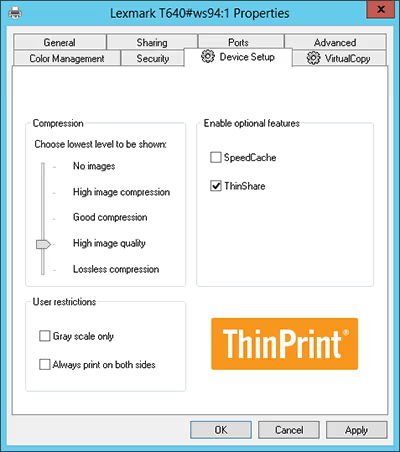
ThinPrint’s compression technology – Advanced Adaptive Compression, first analyzes the individual components of a print job and then compresses the various components (e.g., graphics) with the best possible algorithm. The SpeedCache feature ensures that identical graphics, such as company logos, are transmitted only once. This results in far smaller file sizes which can easily be sent via the corporate network.
In addition, ThinPrint always takes into account the bandwidth available for transferring the print job. The Adaptive Speed feature automatically controls in the background how much data is compressed depending on the available connection.
ThinShare: Print Data Compression of Printer Shares
Unique to ThinPrint’s compression technology is that print data is always compressed – also via a printer share from a desktop PC to the print server. In order to benefit from this particular process, ThinShare, no installations are needed on workstations. Users can easily print via highly-compressed printer shares. ThinShare reduces Wi-Fi traffic and ensures that print servers can be eliminated in branch offices without having to transfer huge amounts of data over WAN connections to a central print server.
Highlights
- Compression of all print data, regardless of the driver used – even with native printing
- Dynamic compression (Advanced Adaptive Compression) and optimization of individual print job elements with the ThinPrint Output Gateway
- ThinPrint Output Gateway reduces print data by up to 98% with texts always being compressed without any loss
- Thanks to ThinShare, significant cost savings are realized through server consolidation in branch offices
- IT administrators can specify the maximum image quality when printing
- ThinPrint Clients for decompression are available for all platforms and are integrated in a wide range of printers
Frequently Asked Questions
Print data compression is the process of reducing the size of print jobs before they are transmitted across a network. In corporate environments, uncompressed print data can place a significant burden on network bandwidth — particularly in organizations with many users, remote locations, or limited WAN connections. Large print jobs containing high-resolution graphics or complex layouts can slow down network performance and lead to delays at the printer. ThinPrint addresses this challenge by compressing all print jobs, regardless of which printer drivers are used or on which system the print job is initiated. This ensures that print data can be transmitted quickly and reliably across the corporate network, even under constrained bandwidth conditions, without compromising the quality of the final printout.
ThinPrint's Advanced Adaptive Compression technology works by first analyzing the individual components of a print job and then applying the most effective compression algorithm to each element separately. Graphics, for example, are compressed differently from text, which is always compressed without any loss of quality. When the ThinPrint Output Gateway virtual driver is used, this process is further optimized, reducing print data volume by up to 98%. Two additional features enhance the compression process further. SpeedCache ensures that recurring graphical elements — such as company logos or standard headers — are transmitted only once across the network, eliminating redundant data transfers. The Adaptive Speed feature continuously monitors the available network bandwidth in the background and automatically adjusts the compression level accordingly, ensuring that print jobs are always transmitted as efficiently as possible without requiring any manual intervention from administrators or users.
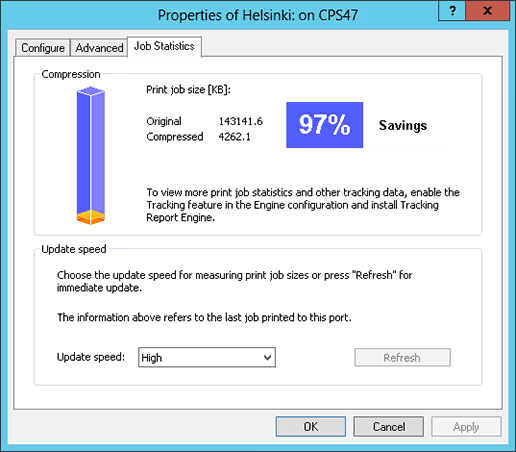
When using ThinPrint's Output Gateway virtual driver in combination with Advanced Adaptive Compression, print data volume can be reduced by up to 98%. The actual compression rate depends on factors such as content type, printer driver, and available network bandwidth: text-heavy documents benefit especially from lossless compression, while jobs containing graphics or images are compressed using the most suitable algorithm for each element, with maximum image quality configurable by IT administrators. The Adaptive Speed feature dynamically adjusts the compression level to current network conditions, making the technology equally effective in high-bandwidth office environments and bandwidth-constrained locations. Detailed savings statistics for each print job are available directly within the ThinPrint interface.
ThinShare is a unique feature of ThinPrint's compression technology that extends print data compression to printer shares — meaning print jobs sent from a desktop PC to a print server are also compressed, not just jobs sent to end devices. What makes ThinShare particularly valuable is that no software installation is required on individual workstations. Users simply print via their existing printer shares, and compression happens automatically in the background. For organizations with branch offices, ThinShare has a significant impact on infrastructure costs. Because print data is compressed even when it is transmitted over WAN connections to a central print server, the need for dedicated local print servers in branch offices can be eliminated entirely. This leads to meaningful cost savings through server consolidation, reduced Wi-Fi traffic, and lower bandwidth consumption — all without any noticeable change to the end-user printing experience.
Get started with high-performing printing!
Download the ThinPrint Engine and discover high-performing enterprise printing. The first 30 days are free, including all ThinPrint features.