
Remote Desktop Printing – Simply Better
ThinPrint is the leading print solution for environments utilizing Microsoft Remote Desktop Session Hosts (RDSH). More than 10,000 customers in all industries and across all continents rely on ThinPrint for their remote desktop printing needs.
Flexible remote desktop printing with ThinPrint
- For users: Fast, easy, reliable printing at any location and with any end device. The common user interface for all printer models ensures the highest levels of usability even when using special features such as stapling or hole-punching.
- For administrators: Easy-to-implement print management provides full control over the printing environment, as well as maximum flexibility when designing the remote desktop architecture and choosing devices.
- For businesses: Cost savings and a faster ROI through a greatly reduced administrative burden, fewer helpdesk calls, lower bandwidth requirements and a far better utilization of the existing infrastructure. Optimal print support and reliable printing results provide the highest levels of user acceptance and increase employee productivity.
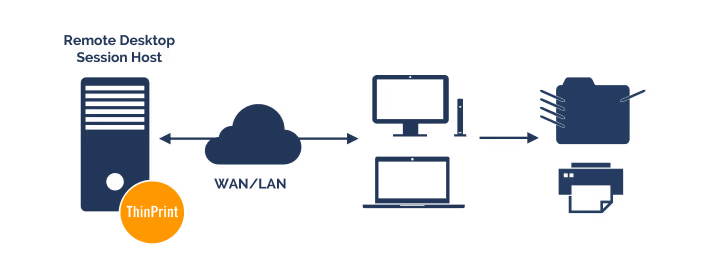
The Complete Solution for all Remote Desktop Environments
ThinPrint can be either used on a Remote Desktop Session Host, formerly known as Terminal Server, or a print server. Regardless of how your remote desktop architecture is configured, ThinPrint offers you:
- Maximum print performance and bandwidth savings due to the leading compression technology: ThinPrint Advanced Adaptive Compression. This includes when printing over TCP/IP, when using native printer drivers and during session-in-session printing
- Highest printing speeds with the streaming, SpeedCache and font management features
- Fast and flexible assigning of local and network printers and reliable setting of the default printer in the remote desktop session thanks to ThinPrint AutoConnect
- Driver Free Printing for all printer models, from all manufacturers: The Remote Desktop Session Host is kept free of management-intensive, native printer drivers
- Physical or virtual desktops are also easily kept free of printer drivers
- Maximum network control through connection-oriented bandwidth management
- Smooth transmission of host print jobs via the RDP channel, such as to SAP clients or for batch printing
- Reliable remote desktop printing when using any thin or zero clients and/or multifunction printers or Macs, as well as in mixed 32/64 bit-environments
Remote Desktop Printing in Large & Complex Architectures
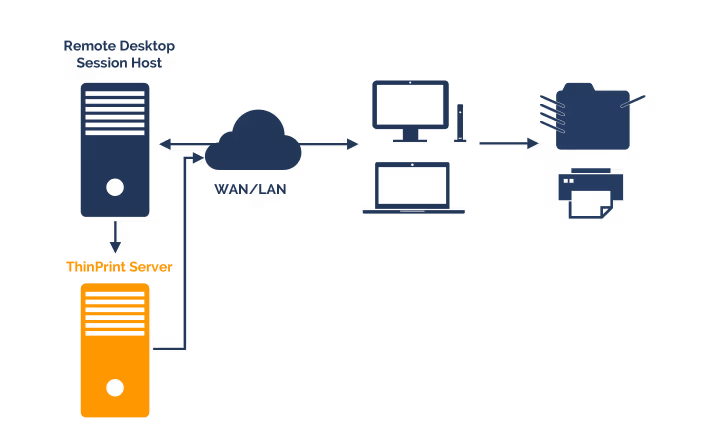
Especially for larger environments, use of a print server (= ThinPrint server) on which all printer drivers are installed and managed, brings with it significant advantages. The ThinPrint server manages all printing processes, reduces the burden on the Remote Desktop Session Hosts as well as the physical or virtual desktops. ThinPrint ensures easy, central print management. Companies always have a complete overview of the printing volume and cost of each department thanks to ThinPrint’s comprehensive tracking and reporting features. ThinPrint is the only printing solution to deliver print jobs even when used on a central print server via the RDP channel – for example, on printers used in home offices. The central ThinPrint server makes an important contribution to the cost-cutting approach of server consolidation as it enables the elimination of print servers in branch offices.
Frequently Asked Questions
ThinPrint is trusted by more than 10,000 customers across all industries and continents for their Remote Desktop printing needs. It delivers fast, reliable, and easy printing for end users regardless of their location or device, while giving administrators full control over the printing environment with minimal management overhead. Businesses benefit from reduced helpdesk calls, lower bandwidth consumption, better infrastructure utilization, and a faster ROI — all while maintaining the highest levels of user acceptance and employee productivity.
ThinPrint uses its industry-leading Advanced Adaptive Compression technology to maximize print performance while minimizing bandwidth consumption. This applies across all connection types — including TCP/IP, native printer drivers, and session-in-session printing. Additional features such as streaming, SpeedCache, and font management further accelerate print delivery. Connection-oriented bandwidth management gives administrators precise control over how much network capacity is allocated to print data, ensuring that printing never negatively impacts other business-critical applications.
One of the most common pain points in Remote Desktop printing is the management of native printer drivers on session hosts. ThinPrint's Driver Free Printing removes this burden entirely — printers from all manufacturers and of all models can be integrated without installing or managing native drivers on the Remote Desktop Session Host or on physical and virtual desktops. This dramatically reduces complexity, minimizes driver-related failures, and lowers the administrative workload for IT teams.
For larger environments, ThinPrint can be deployed on a dedicated print server — the ThinPrint Server — which centrally manages all printer drivers and printing processes. This reduces the load on Remote Desktop Session Hosts and virtual desktops significantly. ThinPrint is the only printing solution capable of delivering print jobs via the RDP channel even from a central print server — for example, to printers in home offices. Comprehensive tracking and reporting features give companies a complete overview of print volumes and costs per department, and the central server architecture enables the elimination of local print servers in branch offices, contributing directly to server consolidation and cost savings.
Get started with the printing software for RDP
Download ThinPrint Engine and discover the total printing solution for Microsoft Remote Desktop Session Hosts. The first 30 days are completely free, including all features.