
Flexibilité maximale : ThinPrint Hub désormais doté du Wi-Fi
Nouveautés de ThinPrint Hub 2.4.20
Le ThinPrint Hub devient encore plus polyvalent : il prend désormais en charge les connexions Wi-Fi, pour un véritable plug & play sur tous vos sites. Il vous suffit de brancher le câble d'alimentation, de vous connecter au Wi-Fi et vous êtes prêt à partir. La solution idéale pour les succursales dotées d'une infrastructure minimale ou pour les sites sans connectivité LAN.

Le nouveau ThinPrint Hub offre une flexibilité maximale.
Les avantages
Déploiement rapide et sans tracas: branchez le câble d'alimentation, établissez la connexion Wi-Fi, c'est fait. Aucun câble Ethernet n'est requis.
Flexible pour n'importe quel endroit: Idéal pour les installations de production et les entrepôts, les chantiers de construction, les boutiques éphémères ou les espaces de travail temporaires, partout où aucune connexion filaire n'est disponible.
Connectez tous les types d'imprimantes: Que ce soit via LAN, USB ou Wi-Fi, le Hub prend en charge toutes les méthodes de connexion courantes pour une compatibilité maximale.
Contrôle total des données: Vos données d'impression restent entièrement stockées dans votre infrastructure sur site. Vous conservez un contrôle total.
Le moyen le plus simple de gérer de manière centralisée vos hubs ThinPrint
Nouveautés de ThinPrint Hub 1.16
ThinPrint Hub 1.16 vous permet désormais de tirer parti de la solution de gestion à distance ThinPrint pour ThinPrint Hubs. Vous disposez ainsi d'une console de gestion centrale pour gérer facilement tous vos ThinPrint Hubs et/ou Personal Printing Release Stations sur le cloud, ce qui vous permet d'apporter facilement des modifications à vos hubs, où qu'ils se trouvent.
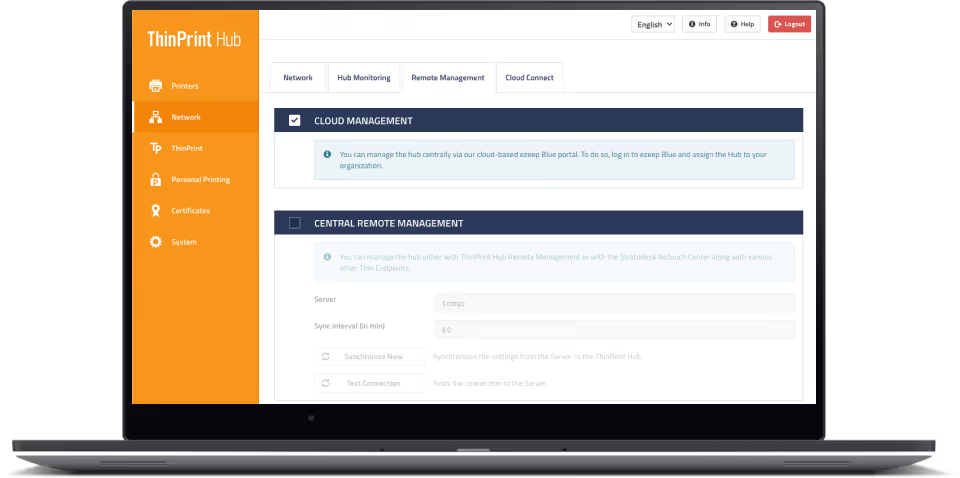
Connectez vos hubs ThinPrint au cloud en quelques clics pour les gérer à distance depuis n'importe quel navigateur Web.
Les avantages
Connectez vos hubs ThinPrint au cloud en quelques clics pour les gérer à distance depuis n'importe quel navigateur Web. Aucune installation ou configuration sur site n'est requise.
Consultez vos configurations actives, changez d'imprimante, configurez de nouveaux certificats ou microprogrammes et apportez d'autres modifications si nécessaire
La configuration est simple. Connectez-vous à la console ThinPrint Hub et cliquez sur Gestion du cloud. Créez un compte avec notre solution d'impression dans le cloud à l'adresse ezeep.com et associez votre Hub à notre solution de gestion à distance en saisissant l'adresse Mac, imprimée au dos du Hub.
Les services d'entreprise ThinPrint Hub, y compris le service de remplacement avancé, peuvent être ajoutés sous forme d'abonnement annuel aux hubs.
ThinPrint Hub propose désormais l'impression dans le cloud
Nouveautés de ThinPrint Hub 1.10
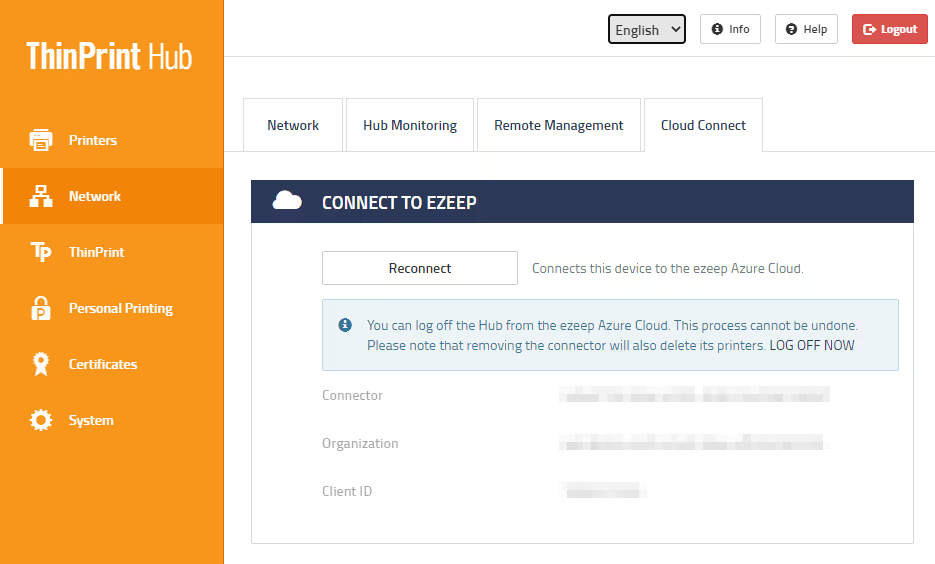
Avec ThinPrint Hub 1.10 et sa nouvelle fonctionnalité Cloud Connect, les entreprises utilisant Azure Virtual Desktop (anciennement Windows Virtual Desktop) et ThinPrint peuvent accéder au cloud ezeep Azure et faire l'expérience d'une véritable impression dans le cloud avec ezeep Blue.
Les avantages
Combinez la vitesse et la fiabilité de la technologie d'impression ThinPrint avec la simplicité et la flexibilité du cloud ezeep.
Connectez votre ThinPrint Hub au cloud ezeep Azure et rendez immédiatement toutes les imprimantes disponibles pour l'impression dans le cloud.
Imprimez à partir de postes de travail distants sans infrastructure supplémentaire. Bénéficiez d'une impression sans pilote grâce au rendu cloud ezeep.
Tout le trafic d'impression est automatiquement chiffré.